Depreciation Software: An SME Controller's Guide

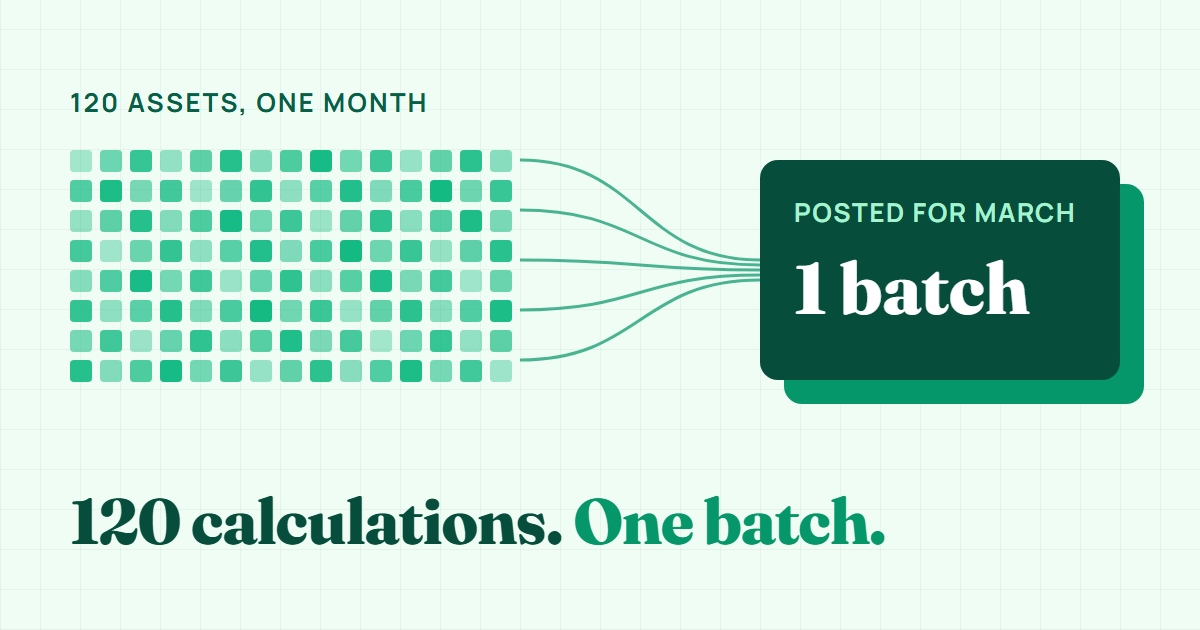
A register of 120 assets on monthly depreciation needs 1,440 separate calculations a year. Each one depends on cost, residual value, useful life, method, and the date the asset entered service, and any of those inputs can change mid-year through a disposal, an improvement, or a revised estimate. A spreadsheet handles the arithmetic easily. What it handles badly is the exceptions. Depreciation software exists to carry those 1,440 calculations, and the journals that follow them, with the exceptions built into the rules instead of into someone's memory.
What follows is written for controllers and bookkeepers who run book depreciation every month and want to automate it without losing control: what to hand over, what to keep, and how the close changes once the calculation stops being manual. Tax depreciation, such as MACRS in the US, is a separate schedule and out of scope here.
What depreciation software should automate
Depreciation software should automate the repeatable arithmetic of each close, while capitalization decisions, estimates, and period approval stay with the finance team.
The useful dividing line is between arithmetic and judgment. Arithmetic repeats every month under the same rules. Judgment happens a few times a year and needs evidence behind it.
Hand the arithmetic to the software:
- The monthly charge per asset, using the method, useful life, and residual value on the asset record.
- The start convention for the acquisition month: full month, half month, next month, or exact days.
- The stop at residual value, so an asset that has reached the end of its life is not charged again.
- Journal entries, built from the GL accounts mapped to each category and dated at period end.
- Reports that reconcile: the depreciation schedule, the roll forward, and the asset register.
Keep the judgment with the finance team:
- Capitalization decisions and the threshold behind them.
- Useful life and residual value estimates, plus the annual review of both.
- Impairment indicators, disposal decisions, and whether a repair is really an improvement.
- Approval of each period before it posts.
A tool that tries to make judgment calls for you, or leaves the arithmetic to you, has the split backwards. The point of automation is that the repetitive part becomes reliable, so your review time goes to the decisions that need a person.
Where manual depreciation breaks
Manual depreciation breaks at the edges: overshoots, ghost assets, skipped months, mid-month acquisitions, and retyped journals.
Manual depreciation rarely fails on the formula. The straight-line calculation is one division. It fails at the edges, and the number of edges grows with the register.
Five failures show up repeatedly in month-end reviews and audit findings:
- The overshoot. A formula keeps charging after the useful life ends, and accumulated depreciation creeps past cost minus residual value. Nobody notices because nobody reviews a 2019 laptop during the monthly close.
- The ghost asset. A machine sold in June keeps depreciating because nobody told the person who maintains the spreadsheet.
- The skipped month. The close runs late, depreciation is not booked for one month, and the following month two months go into a single entry. The year is right, both months are misstated, and the register no longer records which period each charge belongs to.
- The mid-month acquisition. A machine placed in service on the 18th gets a full month in one file and no charge in another, because the convention lives in one person's head instead of in a setting. The article on depreciation start conventions explains the four options.
- The retyped journal. The schedule total and the journal total agree, but one category's charge was keyed to the wrong expense account. The spreadsheet has no link between the schedule and the journal, so the error survives until a reconciliation by account.
A practitioner note: auditors seldom challenge straight-line as a method for an SME. They test whether the policy was applied consistently, often with a quick proxy: depreciation expense divided by average cost, by category, compared with the stated useful lives. They also sample additions and fully depreciated items. Additions are where convention errors sit, and old assets are where overshoots sit, so both show up in exactly the tests the auditor runs.
The automated close: preview, post, reverse
Good depreciation software turns each period into a three-step workflow with a check at every step.
Preview before anything posts
You select the period and the system calculates every asset without writing anything. Review the per-asset amounts and category totals, and compare the total with last month. You can exclude an individual asset whose record is being corrected, for example a cost or in-service date under query. Use exclusions sparingly: an excluded month is not caught up in the following batches (the shortfall is only absorbed at the end of the asset's life), and a pending disposal decision is no reason to stop depreciating, because IAS 16 keeps the charge running until the asset is derecognized or classified as held for sale.
Good software also flags earlier periods that were never posted and makes you acknowledge the gap before posting past it. That surfaces a skipped month at the next close instead of at year-end. Post the missing month first, because once a later period is posted, an earlier one can only be added after the later batch is reversed.
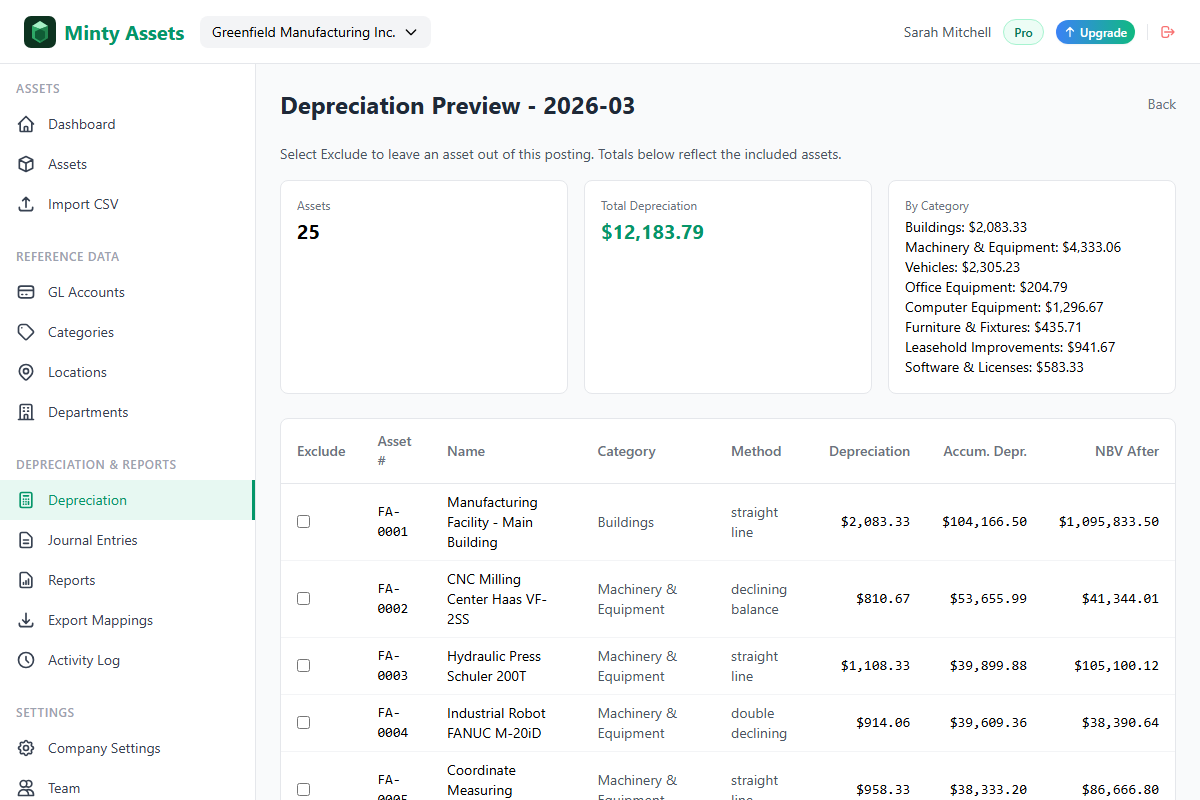
Software does not replace sign-off. Export the preview as the working paper, have someone other than the preparer review and initial it, and post only after that. Where the tool supports user roles, give reviewers view-only access so preparing and approving stay separate.
Post the batch
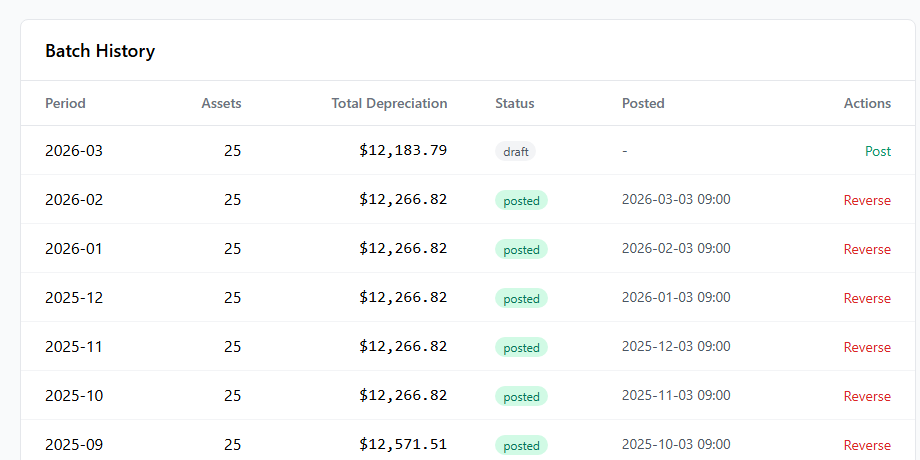
Posting creates the depreciation entries, updates accumulated depreciation, and generates the category journals in one step. Assets that reach their residual value are marked as fully depreciated and drop out of later batches, which removes the overshoot without anyone having to remember it. (Minty Assets builds one journal entry per category from the GL accounts configured on that category, dated the last day of the period.) Posting does not close the period in your general ledger, so keep locking it there as part of the close.
Reverse instead of editing
If a posted batch is incorrect, reverse it. A reversal creates offsetting entries rather than deleting history, so the record keeps the original batch, the reversal, and the corrected batch side by side. Reversals run newest-first, and the reversing journal is dated the day it is made, so a GL period you have already closed is not rewritten. Assets that the faulty batch marked as fully depreciated return to active. An editable history is what makes a spreadsheet hard to defend in an audit; a reversal trail is what makes software easy to defend.
A worked month-end: 120 assets
An automated month-end calculates every asset, applies the company's start convention, and posts one balanced journal entry per category.
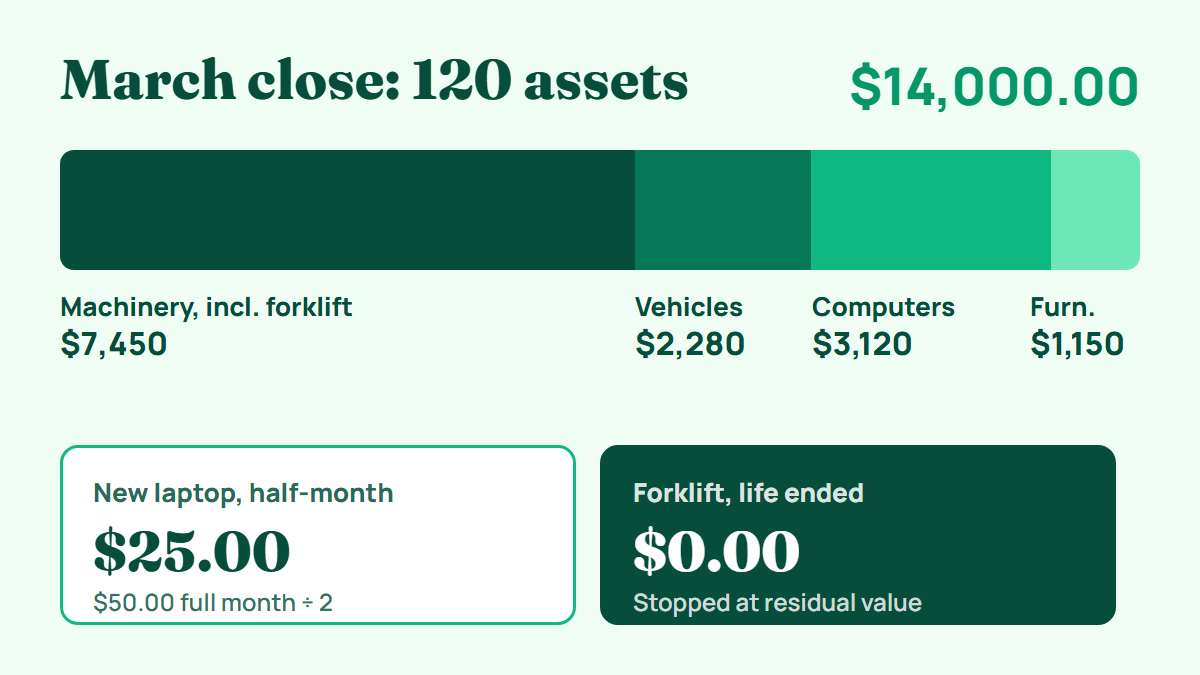
Take a manufacturer with 120 assets, all on straight-line, using the half-month convention (half a month's charge whatever the day of acquisition), closing March.
| Category | Assets in register | March depreciation |
|---|---|---|
| Machinery & Equipment | 18 | $7,450.00 |
| Vehicles | 6 | $2,280.00 |
| Computer Equipment | 64 | $3,120.00 |
| Furniture & Fixtures | 32 | $1,150.00 |
| Total | 120 | $14,000.00 |
Two events in March would each rely on memory in a manual file.
A new laptop. It was placed in service on March 18 at a cost of $1,800, with a 36-month life and no residual value. The full monthly charge is $1,800 / 36 = $50.00. Under the half-month convention March receives $25.00, and that amount is included in the Computer Equipment total above. Under exact days it would receive $22.58 (14 of 31 days), under next month nothing until April, and under full month the whole $50.00. The software reads the company setting and applies it, and the half month left over falls at the end of the asset's life.
A forklift reaching the end of its life. This Machinery & Equipment asset cost $27,000, has a $3,000 residual value, and a 96-month life, so it charged ($27,000 - $3,000) / 96 = $250.00 a month. Its final half-month charge of $125.00 was posted in February, completing the half month carried over from its first month. In March the software charges $0.00 and the forklift carries a fully depreciated status, so the batch covers 119 assets. An uncapped spreadsheet formula would have charged another $250.00 and left accumulated depreciation above the depreciable amount.
The batch produces one balanced journal entry per category, all dated March 31 under the same reference. If each category maps to its own expense and accumulated depreciation accounts, together they look like this:
| Account | Debit | Credit |
|---|---|---|
| Depreciation expense - Machinery & Equipment | 7,450.00 | |
| Accumulated depreciation - Machinery & Equipment | 7,450.00 | |
| Depreciation expense - Vehicles | 2,280.00 | |
| Accumulated depreciation - Vehicles | 2,280.00 | |
| Depreciation expense - Computer Equipment | 3,120.00 | |
| Accumulated depreciation - Computer Equipment | 3,120.00 | |
| Depreciation expense - Furniture & Fixtures | 1,150.00 | |
| Accumulated depreciation - Furniture & Fixtures | 1,150.00 | |
| Total | 14,000.00 | 14,000.00 |
From there the entries go to the ledger as a CSV in the format the ledger expects; the Sage export walkthrough shows what that handoff involves. Your review is a comparison against the approved preview, not a rebuild of the calculation. Add the auditor's proxy check of the charge against cost by category, and reconcile the register to the GL by account each month. The fixed asset journal entries article shows what each line should contain.
Choosing depreciation software: what to check
Choose depreciation software by testing start conventions, the stop at residual value, missed-period warnings, journal generation, reversal history, and opening-balance import against your accounting policy.
Run every candidate against the same questions. The table compares the three common routes; the last column is what to require from a dedicated tool.
| Capability | Spreadsheet | Accounting package built-in | Dedicated software |
|---|---|---|---|
| Monthly calculation | Formulas you maintain | Varies by package and plan | Required |
| Start conventions | Built by hand | Varies by package | A company setting |
| Stop at residual value | Only if the formula caps it | Varies by package | Automatic |
| Missed-period warning | Only if you build a check | Varies by package | Required |
| Journal generation | Typed by hand | Posts to its own ledger | Generated, then exported |
| Reversal with history | Manual, if at all | Varies by package | Required |
| Roll forward report | Built by hand | Varies by package | Included |
| Separate system to reconcile to the GL | No | No | Yes, monthly |
The built-in's real advantage is that last row: there is no subledger to reconcile. Beyond the table, check these points before you commit:
- Methods match your policy. If any category uses declining balance, double declining balance, or sum-of-years' digits, confirm that your plan includes it.
- Opening balances import. You should be able to load cost, accumulated depreciation, and the last depreciation date without re-running years of history.
- Estimate changes are prospective. When a useful life is revised, the carrying amount less the revised residual value should be spread over the remaining life (IAS 8 and ASC 250), not restated backwards.
- Book and tax stay separate. If you need US tax schedules such as MACRS, confirm the tool calculates them or plan a separate tax workpaper.
Moving your register across
The switch itself takes four steps.
- Import with opening balances. Load each asset with the opening figures from the checklist above, so the system starts from the current net book value. Migrating from Excel covers the column mapping.
- Reconcile by category. Agree cost and accumulated depreciation for each category to the GL before posting anything. If your ledger already holds these balances, leave the import's opening-balance journals out of your exports so they are not booked twice.
- Run one month in parallel. Post the first period in the software and calculate the same period in the old spreadsheet. Pick a month with at least one addition and one disposal.
- Retire the spreadsheet. Once the parallel month agrees, archive the file and stop updating it.
On step 3, compare category by category, not just the grand total. Two categories can be off by equal and opposite amounts, and a matching total hides both errors. Any difference that remains is the most valuable thing the parallel run can show you, because it is usually a formula in the old file that had been wrong for years. An old overshoot also appears at step 2, since the import caps accumulated depreciation at cost less residual value. Decide with your auditor whether a historical difference is corrected as a prior-period error or, if immaterial, in the current period, and document the decision.
Frequently Asked Questions
What does depreciation software automate?
Depreciation software automates the monthly charge for each asset, the start convention for new assets, the stop at residual value, the depreciation journal entries, and reconciling reports such as the depreciation schedule and roll forward. Capitalization decisions, useful life estimates, and period approval remain finance team judgments.
Does depreciation software replace the controller's review of month-end depreciation?
No. The review changes from rebuilding the calculation to comparing the preview against last month, checking depreciation expense against cost by category, and approving the batch before it posts. Someone other than the preparer should sign off.
Should I stop depreciating an asset while a disposal decision is pending?
No. Under IAS 16, depreciation continues while an asset is idle or a disposal is being considered, and stops only when the asset is derecognized or classified as held for sale.
How do I move from a spreadsheet to depreciation software without re-running history?
Import each asset with its cost, accumulated depreciation, and last depreciation date, reconcile the opening balances to the general ledger by category, then run one month in parallel with the old spreadsheet before retiring it.
Does Minty Assets calculate MACRS or other tax depreciation?
No. Minty Assets calculates book depreciation only, using straight-line, declining balance, double declining balance, or sum-of-years' digits. US tax depreciation such as MACRS needs a separate tool or tax workpaper.
Ready to automate your asset register?
Minty Assets handles depreciation, journal entries, and audit-ready reports. Free for up to 50 assets, no credit card required.
Start Free