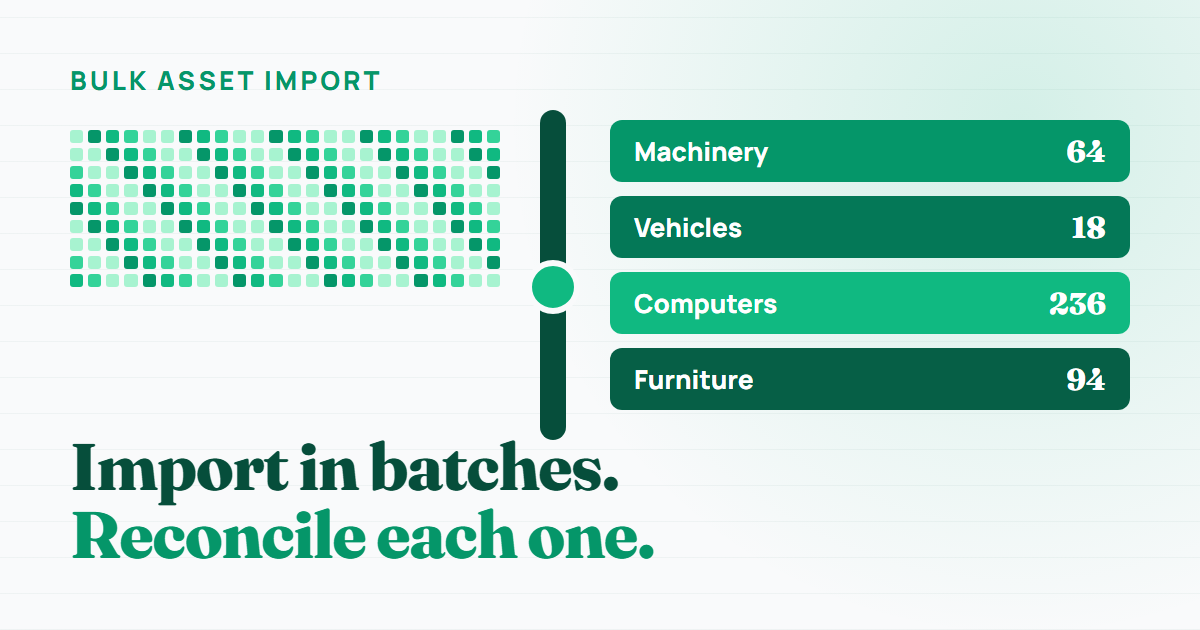
Bulk Asset Import: Migrate Hundreds of Assets in Minutes

A bulk asset import can report 409 assets imported successfully and still leave the register $25,760 short of the general ledger. Three rows failed validation, the screen said so once, and nobody downloaded the error report or compared 409 with the 412 rows in the source file. The gap surfaces a month later, when the first roll forward refuses to agree with the trial balance and someone has to find three assets among four hundred.
The upload itself takes minutes. What protects the result is the work around it: a fixed cutover date, control totals agreed to the ledger before anything moves, and a reconciliation of every batch afterwards. This guide covers that workflow for SME controllers and bookkeepers moving 100 to 1,000 assets into a dedicated register. For the basics of exporting a spreadsheet to CSV and mapping columns, start with the guide to migrating a fixed asset register from Excel.
What a bulk asset import has to carry
A bulk asset import loads many asset records into a register from one file, together with each asset's depreciation inputs and its opening position at a chosen cutover date.
Every row carries three kinds of information. Identity tells you which physical item the record represents: name, serial number, location, department. Depreciation inputs drive future charges: cost, residual value, useful life, method, and in-service date. The opening position records how much depreciation the old system has already recognised, so the asset starts at its correct net book value instead of at full cost.
The costly import problems come from the third group. A missing name is caught immediately. A missing accumulated depreciation figure is accepted without complaint and overstates the register until someone notices.
1. Fix the cutover date and build control totals
Choose the cutover date, the date your old records end and the new register begins, normally a month end that has already been closed. Every opening balance in the file must be measured at that date. A 30 September cutover means accumulated depreciation through September, not through whatever month the spreadsheet was last updated.
Then build control totals by category from the general ledger, not from the spreadsheet. The spreadsheet is the thing being tested, so it cannot also be the standard. If the spreadsheet and the GL disagree before you start, resolve that first. Importing an unreconciled register only moves the difference into a new system, where it looks more authoritative.
The worked example in this guide uses a company with a 30 September 2026 cutover:
| Category | Assets | Cost | Accumulated depreciation | Net book value |
|---|---|---|---|---|
| Machinery & Equipment | 64 | $1,284,500.00 | $642,310.00 | $642,190.00 |
| Vehicles | 18 | $512,000.00 | $287,400.00 | $224,600.00 |
| Computer Equipment | 236 | $389,420.00 | $251,880.00 | $137,540.00 |
| Furniture & Fixtures | 94 | $141,060.00 | $92,215.00 | $48,845.00 |
| Total | 412 | $2,326,980.00 | $1,273,805.00 | $1,053,175.00 |
Filter the source file before you total it. Assets disposed of before the cutover belong in your archive, not in the import, because every imported row becomes an active asset. Assets bought after the cutover should be entered through the normal asset form instead, so they receive an ordinary acquisition journal.
2. Set up categories, locations, and departments first
Create locations and departments and map category GL accounts before uploading, because the import auto-creates only categories. Reference data deserves attention before the file does, because the import treats each field differently. A category name that does not exist is created automatically, with a 60-month straight-line default and no GL accounts mapped. Location and department names are matched to existing records only. An unrecognised location is left blank on the asset rather than created.
Create every location and department in your file before uploading, using exactly the names that appear in it. Then open each category and map its asset, accumulated depreciation, and depreciation expense accounts. Those mappings determine where every later journal lands, so a category created on the fly by a typo such as "Vehciles" posts its journals to placeholder accounts until someone maps it.
3. Prepare the bulk asset import file
Only three columns are required: name, acquisition date, and acquisition cost. For a migration, treat several optional columns as required too, because blank values fall back to defaults that may not match your records.
| Column | What to supply | What happens if it is blank or wrong |
|---|---|---|
| Useful Life (months) | Total life in months, for example 60 | Blank becomes 60 months, whatever the category |
| Depreciation Method | straight_line, declining_balance, double_declining, sum_of_years, or no_depreciation | Blank becomes straight-line; a label such as "Straight Line" is rejected |
| Residual Value | Expected value at end of life | Blank becomes zero; a value above cost is an error |
| Accumulated Depreciation | Depreciation recognised through the cutover | Blank means the asset arrives at full cost |
| Last Depreciation Date | The cutover date | Blank uses the as-of date chosen during mapping |
| In-Service Date | When depreciation started | Blank uses the acquisition date; a date before acquisition is an error |
Use one date format throughout the file. The wizard detects whether dates are day-first or month-first and lets you confirm, but it reads every date in the day/month order you select. A file combining US-style dates from one source with European dates from another will reject some rows and, worse, silently misread any date where the day is 12 or less. Amounts can stay as spreadsheets export them: 1,234.56, 1.234,56, and $1 200 are all accepted.
Add one check column before saving: accumulated depreciation minus (cost minus residual value). Any positive result marks a row where the old register depreciated past the floor. The import caps those rows at the depreciable amount and raises a warning, which keeps book values valid but means your control total will no longer match.
4. Carry the opening position for every asset
Take one asset from the Vehicles batch: a delivery van costing $48,000, with a $6,000 residual value, a 60-month life, and an in-service date of 1 April 2024. Straight-line depreciation is ($48,000 - $6,000) / 60 = $700 a month. From April 2024 to September 2026 is 30 months, so accumulated depreciation at cutover is 30 x $700 = $21,000 and net book value is $27,000. The net book value guide covers this calculation in more detail.
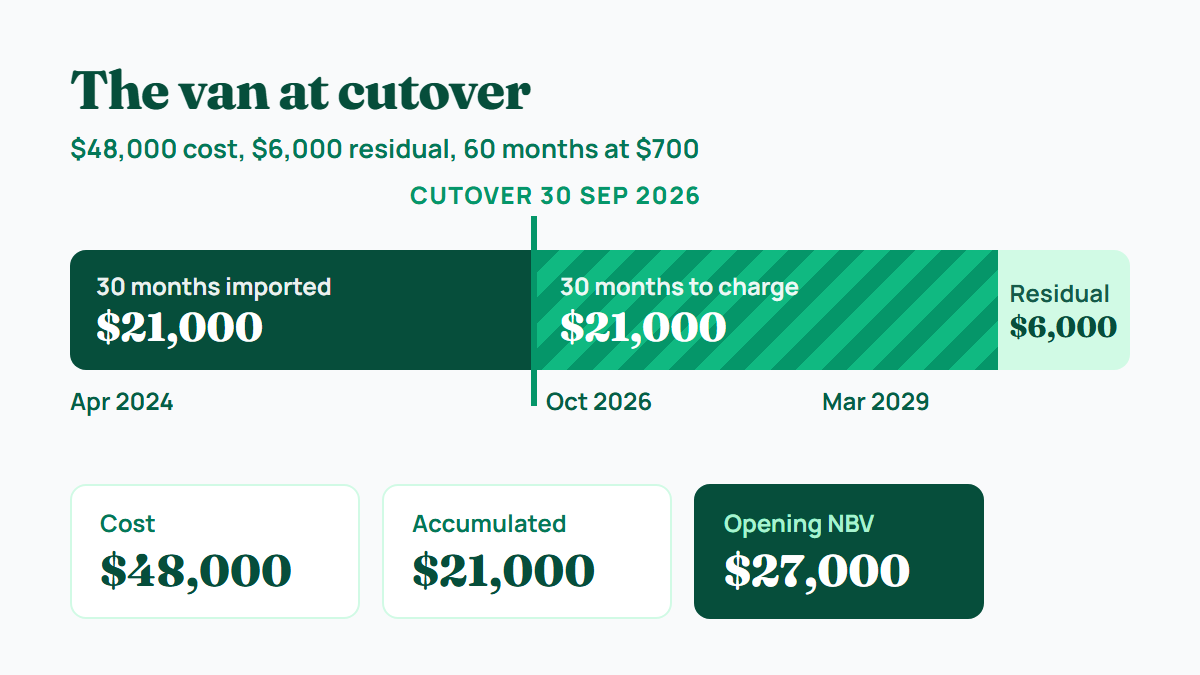
With accumulated depreciation of $21,000 and a last depreciation date of 30/09/2026 in its row, the van enters the register with a net book value of $27,000. The register records an opening balance covering every month through September, and October 2026 is the first period it charges, at $700. The remaining 30 months run to March 2029, when the van reaches its $6,000 residual value.
Leave the accumulated depreciation cell blank and the same van comes in at its full $48,000 cost. The October depreciation preview then lists 30 earlier months, April 2024 to September 2026, as never posted. That warning is useful, but it only appears after the import, which is why the control totals in step 1 matter.
A subtler problem arises when the old register used a different start convention. Suppose it charged half a month for April 2024, giving accumulated depreciation of $20,650 instead of $21,000. The register continues at $700 a month and absorbs the $350 difference in the final month, which comes to $1,050 in March 2029 instead of $700. Nothing is lost, but the odd final charge raises questions years later. Recalculate a sample of opening balances under your new depreciation convention before importing, so you settle those differences now instead of discovering them at the end of each asset's life.
5. Run the import in category batches
Split a large register into one file per category, or per location for a multi-site business. Smaller batches make every reconciliation short: if the Vehicles file is $18,600 out, the problem sits among 18 rows, not 412. The upload limit is 5 MB per file, which holds thousands of rows, so batching is a control choice, not a technical one.
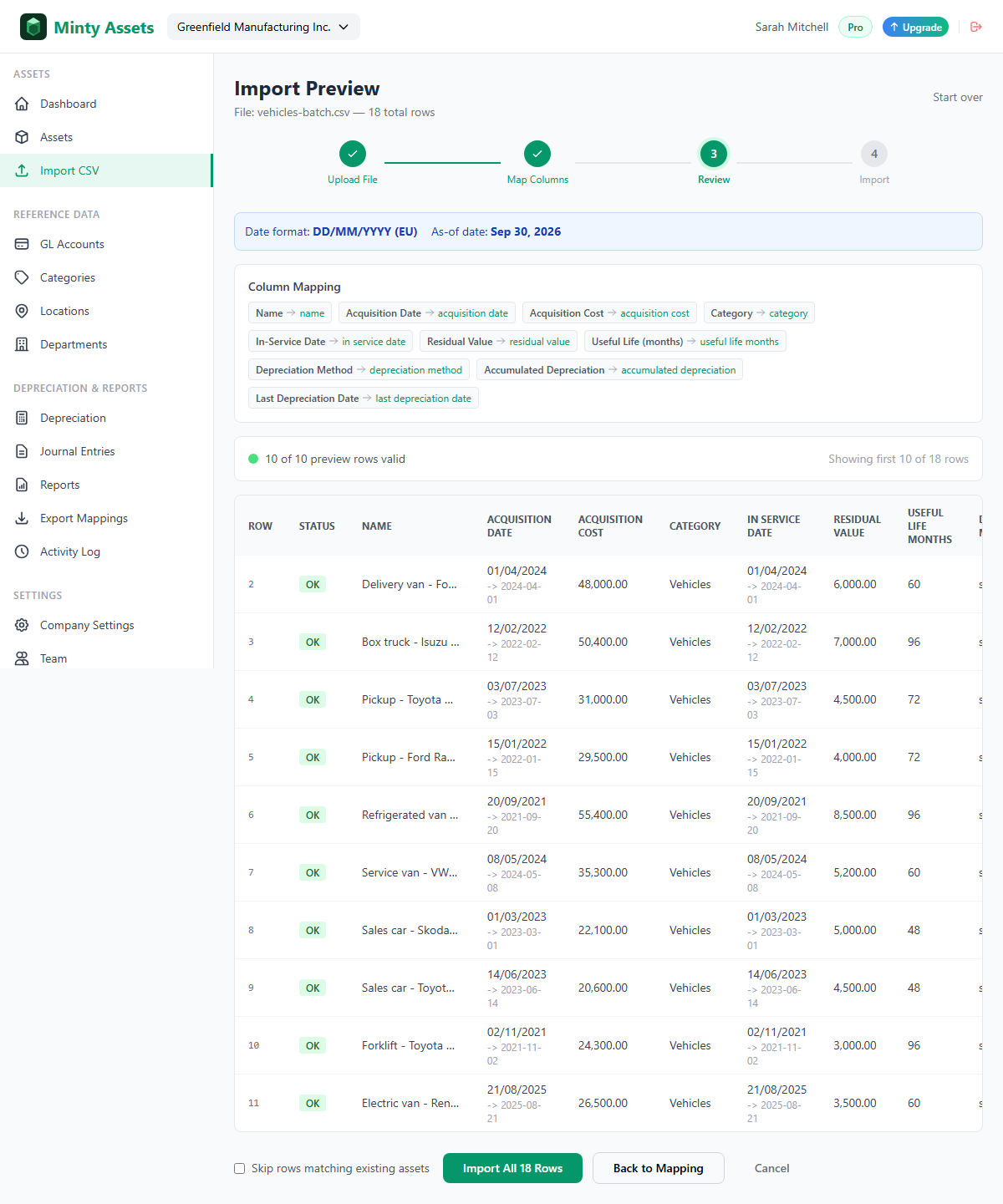
The preview validates the first ten rows in detail, showing parsed dates and each row's status. Plan limits, such as a depreciation method not available on your plan, are checked across the whole file. Other row errors beyond row ten appear only when the import runs. Before uploading, move a few awkward rows to the top of the file: an asset with accumulated depreciation, one with a late in-service date, and one on a declining balance method. If those pass, the rest of the file is likely to follow.
When the import runs, valid rows are written in a single transaction. Rows that fail validation are skipped and listed in a downloadable error report, with the row number, the mapped values, and the reason for each failure. On the Free plan, imports stop at 50 assets and the remaining rows go to the same report, so a register of several hundred assets needs a paid plan before the first batch. (Minty Assets also creates the opening cost and accumulated depreciation journals for every imported asset in the same step.)
6. Reconcile each batch to the control totals
After the first pass, the register in our example holds 409 assets. Three rows went to the error report: a forklift charger with an acquisition date of 31/04/2023, which does not exist; a standing desk whose residual value exceeded its cost; and a tow tractor whose in-service date was a month before its acquisition date.
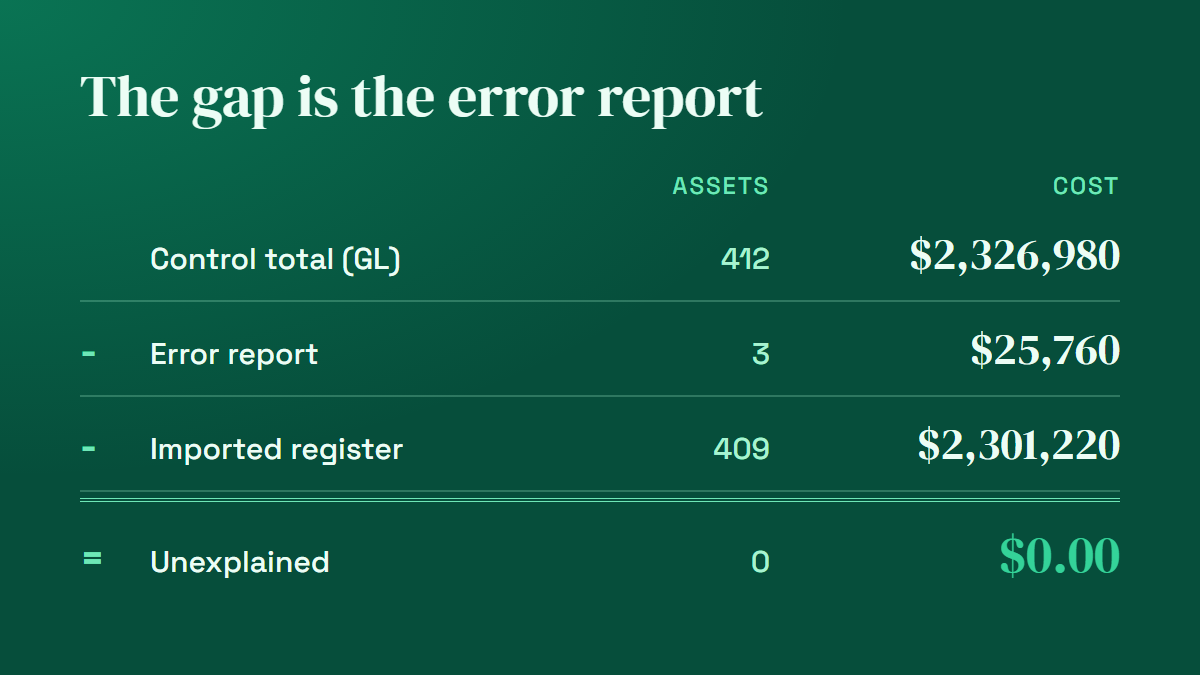
| Category | Control cost | Imported cost | Error report | Unexplained |
|---|---|---|---|---|
| Machinery & Equipment | $1,284,500.00 | $1,279,650.00 | $4,850.00 | $0.00 |
| Vehicles | $512,000.00 | $493,400.00 | $18,600.00 | $0.00 |
| Computer Equipment | $389,420.00 | $389,420.00 | $0.00 | $0.00 |
| Furniture & Fixtures | $141,060.00 | $138,750.00 | $2,310.00 | $0.00 |
| Total | $2,326,980.00 | $2,301,220.00 | $25,760.00 | $0.00 |
Accumulated depreciation follows the same pattern: $1,273,805.00 control, $1,261,410.00 imported, and $12,395.00 on the three failed rows. The unexplained column is the only number that matters. A zero there means every dollar of difference sits in the error report. Anything else points to a capped accumulated depreciation figure, a row skipped as a duplicate, or a row that was never in the file.
Correct the three rows in the error report, leave its Row Number and Errors columns unmapped, and upload it as a fourth small batch. Do not re-upload the whole category file. If you do, the duplicate check, which matches on name, acquisition date, and cost, flags every asset already imported from it, and those rows are imported a second time unless you tick the option to skip them. After the correction batch, run the asset register report filtered by category and confirm each line agrees with the control table.
Then spot-check individual assets by value, not at random. In this register, machinery and vehicles are 82 of the 412 assets but 77% of the cost, so open the 20 largest records and compare each one's cost, life, and net book value to the source.
7. Decide what happens to the opening journals
Opening journals complete the subledger but must not be exported to a general ledger that already holds the balances. Each imported asset produces two journals dated at the cutover. For the van, MIG-ACQ debits the vehicles cost account $48,000 and credits opening balance equity, and MIG-DEP debits opening balance equity $21,000 and credits accumulated depreciation. Together they make the subledger complete: the register's journal entries explain every balance from day one.
If your general ledger already holds these balances, which is true in almost every migration from a spreadsheet, these journals must not be posted to it again. Exclude the migration source type when you export journals, and export only the depreciation from October onwards. Posting MIG-ACQ lines into a ledger that already carries the cost would double every asset account.
Finally, preview October before posting anything. Every imported asset should appear, the opening months should not be flagged as missing, and the batch total should be close to the monthly charge implied by the old register. Post the batch only once that agrees, then confirm the first roll forward opens at the control totals.
Frequently Asked Questions
What is a bulk asset import?
A bulk asset import loads many fixed asset records into a register from one CSV file, including each asset's cost, residual value, useful life, depreciation method, and accumulated depreciation at a cutover date, so every asset starts at its correct net book value.
How do I import assets that are already partly depreciated?
Include an Accumulated Depreciation column measured at your cutover date and a Last Depreciation Date column set to that date. Minty Assets records the opening balance for those months and starts charging depreciation from the following month.
What happens if I leave accumulated depreciation blank in an asset import?
The asset is imported at its full cost. In Minty Assets, the next depreciation preview then flags every month since the in-service date as never posted, so the register overstates net book value until the opening balance is corrected.
How do I reconcile a fixed asset import to the general ledger?
Build control totals of asset count, cost, and accumulated depreciation by category from the general ledger before importing. After each batch, the difference between the control total and the imported register should equal the error report exactly.
Should opening balance journals from an asset import be posted to the general ledger?
Only if the ledger does not already hold those balances. When migrating from a spreadsheet the ledger already carries cost and accumulated depreciation, so exclude the migration journals from exports to avoid doubling the asset accounts.
Ready to automate your asset register?
Minty Assets handles depreciation, journal entries, and audit-ready reports. Free for up to 50 assets, no credit card required.
Start Free