
How to Set Up a Fixed Asset Register from Scratch

Your auditor just asked for a roll-forward schedule. Your CFO wants the net book value of every asset by department. You open your spreadsheet, and it's a mess - half the columns are blank, the depreciation formulas reference deleted cells, and nobody is sure if the laptop list from 2023 was ever updated. Sound familiar?
A fixed asset register solves this. It's the single source of truth for everything your company owns, what it cost, how it's depreciating, and where the accounting entries land. Setting one up properly takes a few hours of upfront work, but it saves days every month-end and makes year-end audit prep painless.
Here's how to set up a fixed asset register from scratch, whether you're building one for the first time or replacing an Excel file that has outgrown its usefulness.
What Is a Fixed Asset Register?
A fixed asset register (sometimes called a fixed asset schedule or FAR) is a complete record of a company's long-lived tangible and intangible assets. For each asset, it tracks identity, classification, financial details, and depreciation history.
Every company that follows GAAP or IFRS is required to maintain one. Auditors review it annually. Tax filings depend on it. If yours lives in a spreadsheet with broken formulas, you're carrying risk you don't need.
A proper register does three things well:
- Tracks what you own - name, location, serial number, responsible person, status
- Calculates depreciation automatically - using the correct method and useful life for each asset
- Produces reports on demand - the roll-forward, depreciation schedule, and asset listing that auditors and management request
Before You Start: 5 Decisions to Make
Jumping straight into data entry is tempting. Resist it. The decisions you make before entering a single asset determine whether your register is useful or just a prettier version of the spreadsheet you're replacing.
1. Set a Capitalization Threshold
Not every purchase is a fixed asset. Your capitalization threshold defines the minimum cost for an item to be recorded as a capital asset rather than expensed immediately. Common thresholds range from $500 to $5,000 depending on company size.
Pick a number and apply it consistently. If your threshold is $1,000, a $950 office chair gets expensed. A $1,200 desk gets capitalized. No exceptions, no judgment calls per purchase.
2. Choose Your Depreciation Method
Four methods cover virtually all SME needs:
- Depreciation method: Straight-line - equal amounts each month. Simple, predictable, and by far the most common for book depreciation
- Declining balance - a fixed percentage of the remaining book value. Front-loads depreciation for assets that lose value quickly
- Double declining balance - twice the straight-line rate, switching to straight-line when that produces a larger deduction
- Sum of years' digits - another accelerated method based on remaining useful life
Most small businesses use straight-line for book purposes. If you're unsure, start there. You can assign different methods to different categories later.
3. Define Your Category Structure
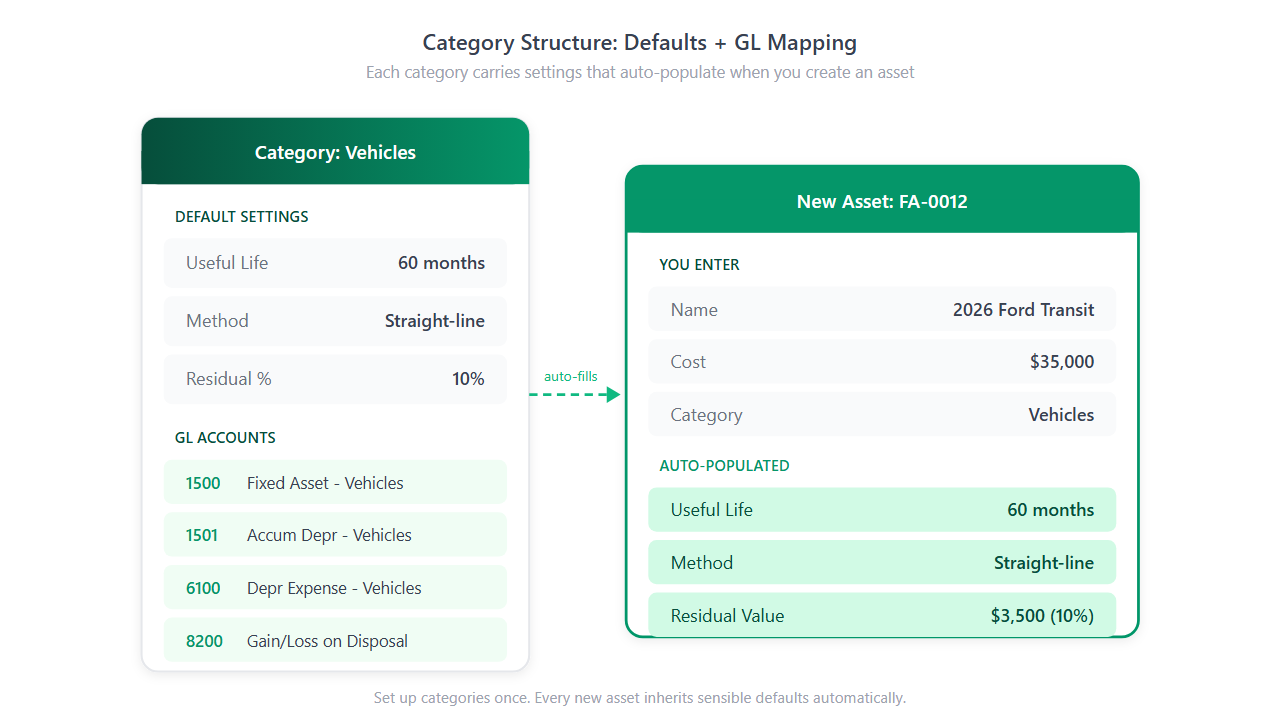
Categories group similar assets and carry default settings - useful life, depreciation method, residual value, and GL accounts. Getting categories right means less manual work per asset.
Eight categories cover the majority of SME asset bases:
| Category | Typical Useful Life | Common Method |
|---|---|---|
| Buildings | 30-40 years | Straight-line |
| Machinery & Equipment | 7-10 years | Straight-line or Declining balance |
| Vehicles | 5-7 years | Straight-line |
| Office Equipment | 5 years | Straight-line |
| Computer Equipment | 3-5 years | Straight-line |
| Furniture & Fixtures | 7-10 years | Straight-line |
| Leasehold Improvements | Lease term | Straight-line |
| Software & Licenses | 3-5 years | Straight-line |
You don't need all eight. If your company has no buildings, skip it. If you have a unique asset class (medical equipment, restaurant fixtures, broadcast equipment), add a category for it. The goal is that picking a category should auto-fill sensible defaults for 90% of assets.
4. Map Your GL Accounts
Each category needs four GL accounts:
- GL account - where the acquisition cost sits on the balance sheet (e.g., 1500 - Vehicles)
- Accumulated Depreciation - the contra-asset account (e.g., 1501 - Accumulated Depreciation, Vehicles)
- Depreciation Expense - the income statement charge (e.g., 6100 - Depreciation Expense, Vehicles)
- Gain/Loss on Disposal - for when you sell or scrap an asset (e.g., 8200 - Gain/Loss on Disposal)
If your chart of accounts doesn't have these yet, create them before setting up the register. Proper GL mapping is what turns your asset register from a list into an accounting tool that generates journal entries automatically.
5. Pick a Depreciation Start Convention
When an asset is purchased mid-month, how much depreciation do you record in that first month? Four conventions are standard:
- Full month - a full month of depreciation regardless of purchase date
- Half month - half a month in the acquisition month
- Next month - depreciation starts the month after acquisition
- Exact days - prorated based on the actual days remaining in the month
Full month is the most common for SMEs. Pick one and apply it company-wide for consistency.
Building Your Register: The Fields That Matter
Every asset in your register should capture these core fields:
Required:
- Asset name and description
- Category
- Acquisition date and in-service date
- Acquisition cost
- Residual (salvage) value
- Useful life in months
- Depreciation method
Recommended:
- Location and department (critical for filtering reports)
- Serial number (for physical audits)
- Supplier, PO number, warranty expiry (for procurement tracking)
- Responsible person (who owns this asset operationally)
A good register auto-generates an asset number (e.g., FA-0001, FA-0002) so every asset has a unique, sequential identifier. (Minty Assets generates these automatically with a configurable prefix and starting number.)
Adding Your First Assets: A Worked Example
Say you're registering a delivery van purchased on 15 January 2026 for $35,000 with a $5,000 residual value and a 5-year useful life.
Here's how the key fields look:
| Field | Value |
|---|---|
| Name | 2026 Ford Transit - Delivery Van |
| Category | Vehicles |
| Acquisition Date | 15 Jan 2026 |
| Acquisition Cost | $35,000 |
| Residual Value | $5,000 |
| Useful Life | 60 months |
| Method | Straight-line |
| Monthly Depreciation | $500.00 |
| Location | Main Warehouse |
| Department | Logistics |
The monthly depreciation calculation: ($35,000 - $5,000) / 60 months = $500.00. Straightforward, and the register handles it automatically once the asset is entered.

Migrating Existing Assets from a Spreadsheet
If you already have assets tracked somewhere, you don't need to re-enter them one by one. A CSV import handles bulk migration in minutes.
The critical piece: include an Accumulated Depreciation column in your CSV. This tells the register how much depreciation has already been recorded, so it picks up where your old system left off. Without it, the register would start depreciating from zero as if the asset were brand new.
Practical steps:
- Export your current asset list to CSV
- Map your CSV columns to register fields (name, acquisition date, cost, useful life, accumulated depreciation)
- Preview the import to catch errors - mismatched dates, missing costs, duplicate entries
- Execute the import - assets are created with correct net book values from day one
An experienced controller knows this is where the real time savings happen. Re-keying 200 assets manually would take a full day. A CSV import with validation and error reporting takes 10 minutes.
Running Your First Depreciation
With assets loaded, you're ready to run depreciation. The workflow should follow a preview-post-verify pattern:
- Select the period - choose the year and month
- Preview - review the calculated depreciation for every asset before committing anything. Check that amounts look reasonable and no assets are missing
- Post - confirm the batch. This locks the entries, updates accumulated depreciation, and generates journal entries (DR Depreciation Expense / CR Accumulated Depreciation)
- Verify - check that journal entries were created with the correct GL accounts and amounts. Export to your accounting software if needed
If something looks wrong after posting, a proper register lets you reverse the entire batch - creating offsetting entries and restoring the previous state. No manual corrections, no formula patching.
Maintaining Your Register Going Forward
Setting up the register is a one-time effort. Keeping it accurate is an ongoing rhythm:
Monthly:
- Run and post depreciation for the current period
- Export journal entries to your accounting software
- Record any new asset acquisitions
As they happen:
- Record disposals (sales, scraps, write-offs) with proceeds and gain/loss
- Log capital improvements that increase an asset's cost or extend its life
- Update locations and departments when assets move
Quarterly or annually:
- Review the fully depreciated assets report - are any of these still in use? Should they be disposed?
- Run the roll-forward report for financial statement preparation
- Reconcile register totals to your general ledger
The 80/20 rule applies to asset registers: roughly 20% of your assets by count represent 80% of total value. Focus your attention on high-value categories first - buildings, machinery, vehicles. If the top 20% is accurate, your financial statements are materially correct even if a few minor assets have small discrepancies.
Frequently Asked Questions
What is a fixed asset register?
A fixed asset register is a centralized record of every long-lived asset a company owns. It tracks acquisition cost, depreciation method, useful life, accumulated depreciation, and net book value for each asset, serving as the source of truth for financial reporting and audits.
How many categories do I need?
Most SMEs need between 4 and 8 categories. Common ones include Buildings, Vehicles, Computer Equipment, Furniture, and Machinery. Each category carries default settings for useful life, depreciation method, and GL accounts, so adding a new asset requires minimal manual configuration.
What is a capitalization threshold?
A capitalization threshold is the minimum purchase cost for an item to be recorded as a fixed asset rather than expensed immediately. Typical thresholds range from $500 to $5,000 depending on company size and policy.
Can I import existing assets from Excel?
Yes. Export your spreadsheet to CSV and use an import wizard to map columns to register fields. Include an accumulated depreciation column so that partially depreciated assets carry over with the correct net book value from day one.
Ready to automate your asset register?
Minty Assets handles depreciation, journal entries, and audit-ready reports. Free for up to 50 assets, no credit card required.
Start Free